
You can define the order and thus the prioritization of the translation memories in which translations are to be searched for. Proceed as follows:
-
Select the command EDIT TRANSLATION MEMORIES in the main menu of the "Edit translation memories" dialog box.
-
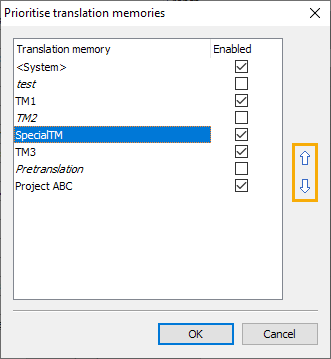
In the "Prioritize translation memories" dialog box that appears, use the arrow icons on the right-hand side to specify the order and thus the prioritization of the available translation memories.
-
You can also activate or deactivate translation memories in the "Active" column by clicking on the respective checkbox. All active translation memories are used for the translation of customer reports.
-
Complete the configuration in the "Prioritize translation memories" dialog box with the "OK" button.