
In addition to the familiar finders for the various types of securities - "Finder Shares", "Finder Warrants" or "Finder Bonds" - finders optimized for portfolio management are also available.
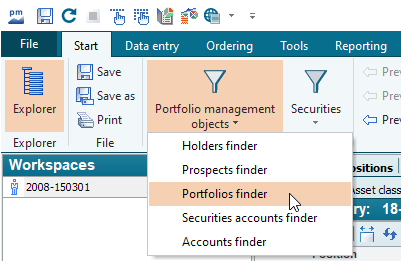
Proceed as follows, for example, to start this finder:
-
Select the Finder icon "Depot objects" on the "Start" tab.
-
Select the desired finder (FINDER INHABER, FINDER PORTFOLIOS...) in the menu that pops up.
In the workspace, the "Finder Depotmanagement" is divided into worksheets:
Worksheet "Finder Holder"
-
Finder owner
-
Finder owner extended
Worksheet "Finder Portfolios"
-
Finder Portfolios
Worksheet "Finder Depots"
-
Finder Depots
-
Finder Depots extended
Worksheet "Finder Accounts"
-
Finder accounts
-
Finder accounts extended
Worksheet "Finder interested parties"
-
Finder interested parties
(module "Infront Advisory Solution consulting process" or module "Person management")
You can use the filter settings at the top of the table to define your criteria for the Finder columns as usual. For information on the filter settings in the Depot Management finder, please read the section Finder.