
You have the option of storing securities costs (product costs) historically in the master data. You can manually enter values for total costs, entry and exit costs and running costs.
-
For example, use the PROPERTIES command in the context menu of the security in the Explorer to open the master data of the security.
-
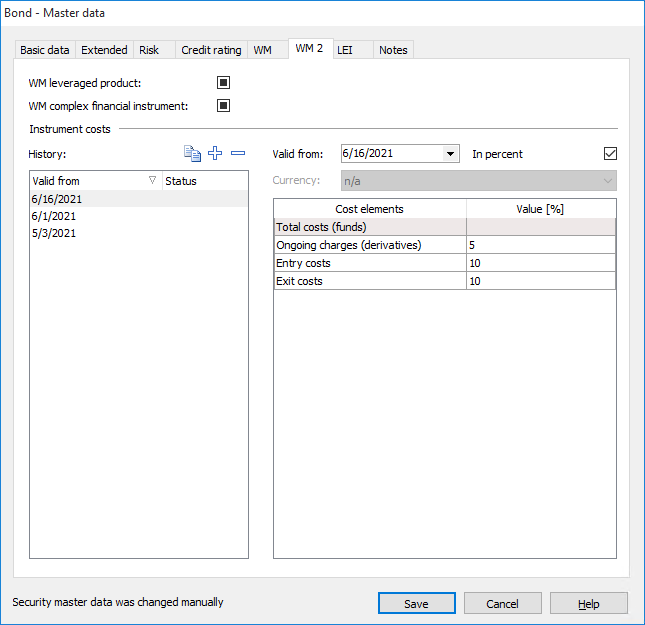
Switch to the "WM 2" tab in the master data.
-
Create a new history entry in the "History" area using the "Create new entry" icon.
-
Select the desired start date for this cost rate in the "Valid from:" field using the integrated calendar.
-
Enter the desired values for the cost components.
For details on the individual security types, please also read the section Security costs in Infront Portfolio Manager - An overview. -
Proceed in the same way for all other history entries.
-
Once you have entered all the data, select the "Save" button to save the securities cost history and close the dialog box.
The following functions are available for recording histories:
|
Field |
Description |
|---|---|
|
|
Select this icon to create a copy of the currently selected entry to quickly enter additional entries. The entry appears in the list with the status "New". This status disappears after saving. |
|
|
Select this icon to create a new history entry. The entry appears in the list with the status "New". This status disappears after saving. |
|
|
Select this icon to delete the selected history entry. Entries deleted in this way initially remain in the list with the status "Deleted" and are only removed after saving. |
|
Field "Valid from:" |
Use the integrated calendar to set the desired start date for the cost rate. |
|
In percent" field |
Activate this checkbox if the cost item is a percentage value. This checkbox is activated for the securities costs of funds and cannot be edited, as only percentage values are possible here. |
|
Currency |
Select the appropriate valuation currency from this selection list. The value "n/a" is permanently selected here for the securities costs of funds, as only percentage values are possible here. |
|
Column "Value" or "Value [%]" |
Enter the percentage values or the absolute values in the respective currency for the cost categories here. With a NAV of 100, the value "2" in the "Total costs (fund)" line means that the total costs amount to 2% of the NAV per year.
|
|
Valid from" column |
In this column you can see the start date of the respective history entry. |
|
Status" column |
In this column you can see the status of the respective history entry, e.g. "new" for newly created entries that have not yet been saved. |


If historicized costs for the same security are delivered via the cost service , then all locally configured histories have priority over the values delivered via the service.