
Loans are classified as "Special investments".
To record loans taken out correctly, proceed as follows:
-
Open the "Enter transactions" worksheet as described above in the section Enter transactions and select the desired holder if necessary.
-
Open the ACCOUNT menu in the "Enter transactions" worksheet.
-
Select the transaction type RECORD CREDIT at Account transaction types .
Use the keyboard to enter loans with the "Enter transactions" worksheet open as follows: Press the key combination <CTRL>+<2> for the account transaction types. Then press the button<B>.
The "Take out a loan" dialog box appears.
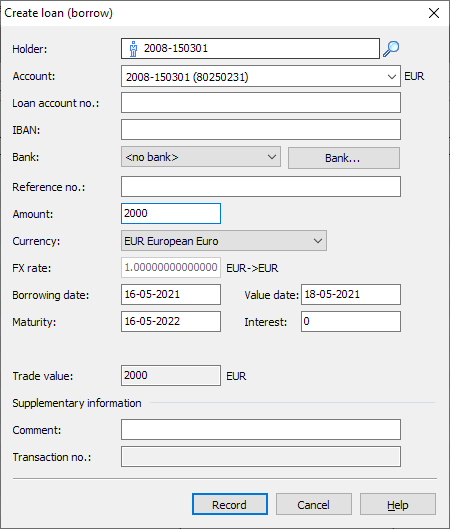
This dialog box largely corresponds to the "Invest fixed-term deposits" dialog box. However, there is no field for the interest calculation method for loans and the amount in the account is of course positive (fixed-term deposits are negative). -
Complete or change the information in the input fields if necessary.
-
Finally, confirm the entries with the "Enter" button.
Use the credit overviewto display all the loans recorded for a holder at a glance.