
Module "Portfolio Service Extended Portfolio Analysis"
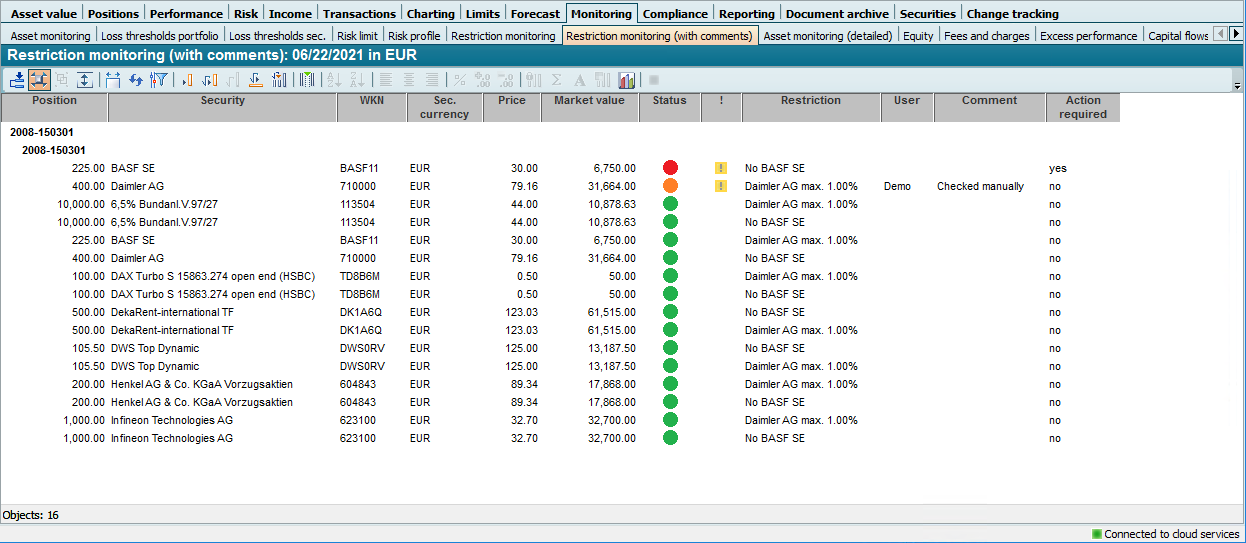
This "Restriction monitoring (with comments)" report, which you can find in the "Monitoring" template category, is used to analyze and enter comments on restriction checks.
This table can be opened for portfolios, owners and groups. Depending on this input object, only the restrictions at this level are monitored. For example, if you have opened the workspace of a portfolio, only the restrictions assigned at portfolio level are monitored in this evaluation, but not the restrictions at holder and group level, etc.
Use the context menu of a line (right mouse button) to open the "Restriction checks for position" dialog box via the SHOW RESTRICTION CHECKS command. For full details of this function, read the section
Comment on restrictions.
The "Restriction monitoring (with comments)" report has the following columns:
|
Column |
Description |
|---|---|
|
Portfolio, owner or group
|
Name of the portfolio, holder or group for which the restriction monitoring is currently being evaluated. The table is grouped according to these columns on the first level. |
|
Depot |
Name of the securities account. The table is grouped according to this column on the second level. |
|
Stock |
The number of units of the respective security in the custody account. |
|
Securities |
The name of the security. |
|
WKN |
The security identification number of the security. |
|
WP currency |
The currency from the "Currency" field of the quote properties (standard valuation place). |
|
Course |
The most recent price of the security in securities currency on the evaluation date. |
|
Market value |
The market value of the position in evaluation currency. |
|
Status |
You can recognize the status of the restriction by the symbol in this column:
The possible combinations are described in the table in the previous section Restriction monitoring . |
|
! |
A warning sign is displayed in this table column if the position violates a restriction assigned to the portfolio, the holder or the group. Only the restriction violations that are defined at the current level are displayed here. If the evaluation is open for a portfolio, for example, only the restriction violations of the restrictions assigned at portfolio level are displayed. |
|
Restriction |
The name of the respective restriction. |
|
Users |
The user who entered the current comment for this position-restriction pair. |
|
Comment |
The comment entered for this position-restriction pair (current on the evaluation date). |
|
Action required |
This column shows "yes" if an action by the user is required for this position-restriction pair, otherwise "no". |
|
Current exchange rate Unknown Attachment |
The exchange rate between the evaluation currency and the item currency on the evaluation date. |
|
Already processed Unknown Attachment |
This column shows "yes" if this item-restriction pair has been given the "Processed" indicator, otherwise "no". |
|
ISIN Unknown Attachment |
The ISIN of the security. |
|
Status changed Unknown Attachment |
This column shows "yes" if the status of this position-restriction pair has changed, otherwise "no". |
|
Security no. Unknown Attachment |
The security number of the security. |
|
WP type Unknown Attachment |
The security type: Share, bond, fund.. |


Overlapping validity periods (i.e. several comments on a position-restriction pair on the same day) are excluded when entering the comments.
If there is no comment at the time of evaluation, the columns "Status changed", "Already processed", "User" and "Comments" are displayed as empty in the "Restriction monitoring" evaluation. The sorting in this case is first by status ("traffic light"), then by "Action required" and finally by security/position. This places entries at the top for which an action is required.
You can configure the evaluation date and currency using the table parameters (<CTRL>+<A>).