
Object links can be found in the toolbar below the input field of your browser on the so-called link bar, which you can show and hide via the context menu of your browser's toolbar.
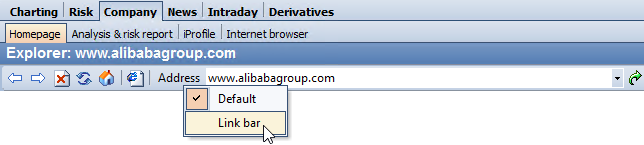
The individual functions can be found in the following table:
|
Function |
Description |
|---|---|
|
|
To go directly to the company's homepage, select the object link "Homepage". Please note that a homepage is not available and stored for all securities. Please read the section Display homepage. |
|
|
Select this object link to go directly to the latest news on the share. Please read the Newssection. The licensed "Messages" module is required. |
|
|
If you have licensed the "Fundamental Special" module, you can access the fundamental data directly via the "iProfile" object link. There you will find the most important information about the most important companies from all over the world as well as the latest balance sheets. Please read the section Fundamental data online. |
|
|
Use the object link "Analysis & Risk Report" to call up theScreener's comprehensive analyses of the company. Read the section Analysis & Risk Report online. The prerequisite for this is the activated "Analysis & Risk Reports" module. |
|
|
If you have licensed the "Fund prospectuses" module, the FWW fund prospectuses for funds are available to you in the browser. Please read the section Fund prospectuses. |
|
|
You can save interesting websites as favorites and define your own object links for them. Please read the section Favorites on the Internet. |




