
Proceed as follows to define the time series for a comparison value yourself:
-
Select the command TIME SERIES FOR COMPARATIVE VALUES in the menu of the "Edit time series" icon on the "Chart" tab.
-
A dialog box appears in which you can define the comparison value.
-
Save all changes with "OK".
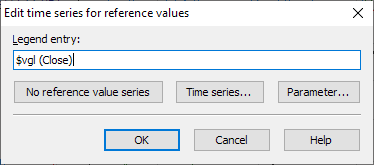
|
Field |
Description |
|---|---|
|
Legendsentry |
This determines how the comparison value is designated in the chart. |
|
No comparative value series |
Deletes all inserted comparison values from the display. |
|
Time series.. |
The formula editor or a selection dialog appears in which you can select a time series. |
|
Parameters.. |
This is where you set the individual parameters for the comparison time series. As the comparison value is usually a simple price trend (spot or close), no settings are usually necessary. |