
Module "Advanced Technical Analysis"
You can call up the parameters of the "Signal performance" evaluation and change the already optimized default settings if necessary.
-

-
As usual, the default parameters are displayed in the left-hand area and can also be changed here.
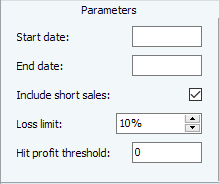
The "Signal performance" evaluation has the following parameters:
|
Parameters |
Description |
|---|---|
|
Start date |
The start date of the analysis period. |
|
End date |
The end date of the analysis period. If nothing is entered here, the date from the properties of the signal system (or trading system or trend analysis folder) is used. However, you can also specify a different analysis period. This allows the table of signals to be limited to a section once again. Please note that no additional signals are calculated if the time period is extended beyond the range set in the input object. |
|
Include short sales |
[Enabled by default] Deactivate this checkbox if the short sales are not to be included in the performance evaluation. Short selling refers to the sale of securities that are not owned by the seller. |
|
Loss limit |
As it often makes sense to work with limits, a loss limit of 10% is set here by default. Make your individual settings. |
|
Hit gain threshold |
Specify here the percentage profit above which the performance should be counted as a hit. To take any bank charges into account, you can enter "1" (for 1%) here, for example. |

You can also display the signal performance in the respective chart. This allows you to immediately recognize the consequences of changing the parameters.