
Proceed as follows to create a new corporate action in the "Enter corporate actions" dialog box:
-

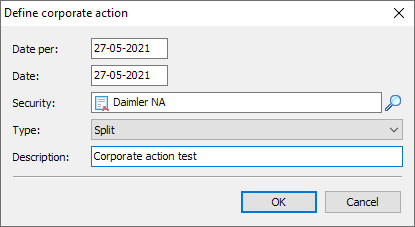
The "Define corporate action" dialog box appears. Enter the desired data here:
-
In the "Date as of" input field, enter the date on which the position in the security is determined. The default setting is the current date.
-
Enter the execution date of the corporate action in the "Date" input field. The default setting is the current date.
-
Then enter a search term in the "Security" input field and press the <RETURN> button. Or select the magnifying glass icon to search the database for the security affected by the corporate action.
-
Select the type of corporate action in the list below. In detail, you will find the following corporate actions here:
- Capital increase
- Cash capital increase
- Capital increase in kind
- Capital increase from company funds
- Capital reduction
- Share swap
- Spin-off
- Fusion
- Cash dividend
- Stock dividend
- Split
- Reverse split
- Par value reduction
- Nominal value increase
- Nominal value repayment
- Other
-
If necessary, enter a brief comment in the "Description" input field for the corporate action.
-
If you confirm the entries in the "Define corporate action" dialog box with "OK", the new corporate action is added to the list.
-
Finally, close the "Enter corporate actions" dialog box with "OK".
You list the corporate actions recorded in this way for owners in the Corporate actions report , for example.