The MAINTENANCE menu item contains the following commands:
|
Element |
Description |
|---|---|
|
CHECK DATABASE |
The database check is only available for MS-SQL. Select this command to perform a database check. Errors are output but not repaired. The database check is also part of the complete maintenance. |
|
COMPACT DATABASE |
Select this button to compact your MS SQL database. Alternatively, you can also start the compacting process using the "Compact database" button. Compacting is also part of complete maintenance. |
|
ANALYZE DATABASE CONTENTS |
Select this command to analyze the structure of the database and have it checked for errors. |
|
REPAIR COURSE SYSTEM |
Select this command to check the course system and repair any errors found. |
|
CHECK COURSE SYSTEM REFERENCES |
Select this command to check the references between the course system and the database and repair any errors found. |
|
REORGANIZE COURSE SYSTEM.. |
Select this command to compact or defragment the course system. For details, please also read the section Reorganize course system. |
|
DELETE DOCUMENTS WITHOUT ASSIGNABLE OBJECT |
If there are documents from the document repository in the database to which no objects can be assigned, you can delete such documents using this command. |
|
OPTIONS.. |
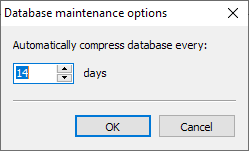
Select this command to enter an interval for the regular automatic database compacting of your MS SQL database in the dialog box that appears. The default setting is 14 days.
|