
To fix valuation price quotations manually, select the command VALUATION PLACE ASSIGNMENTS on the "Data maintenance" tab.
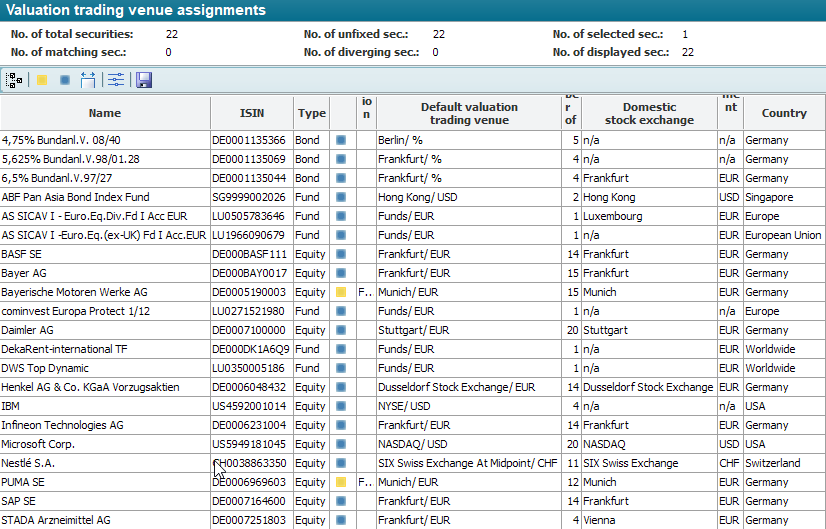
In the "Valuation center assignments" workspace that appears, you will see a quantitative summary of the securities in the real universe in the upper area.
|
Field |
Description |
|---|---|
|
Number of securities |
Number of all securities in the real universe. |
|
Number matching |
Number of securities for which the fixing and rule-based specification are identical. |
|
Number not fixed |
Number of securities for which there is no fixing (indicated by the blue status icon). |
|
Number deviating |
Number of securities for which fixing and rule-based specification differ (indicated by the yellow status icon). |
|
Number selected |
Number of securities that are currently selected. |
|
Number displayed |
Number of securities currently displayed (after filtering within the table). |
Below you will see a table with the following columns:
|
Column |
Description |
|---|---|
|
Name |
The security designation from the master data. |
|
ISIN |
The ISIN of the security. |
|
Type |
The type of security. |
|
Status icon |
The status icon shows the fixing status of the respective security. The following three states are possible:
|
|
Valuation place fixed |
The currently fixed valuation place (place/currency). |
|
Valuation place Default |
The proposed valuation place (place/currency) resulting from the configuration (see Configuring valuation places) for automatic assignment. |
|
Number of quotes |
The number of quotes currently available for the security. |
|
Home exchange |
The home stock exchange (place) of the security is the stock exchange in whose economic environment the registered office and/or head office of a company is located and on which this company is listed. This master data information flows into the rule-based determination of the valuation location default (see Configuring valuation locations). |
|
Settlement currency |
The settlement currency (risk currency) of the security is the currency in which over-the-counter transactions are generally settled. This master data information flows into the rule-based determination of the valuation location default (see Configuring valuation locations). |
|
Country |
The country entered in the "Country" field in the securities master data. This master data information flows into the rule-based determination of the valuation location default (see Configuring valuation locations). |


You can also use the valuation center assignment for any other securities. Simply right-click to open the context menu of a folder containing the securities and select the command MOVE TO OPEN WORKSPACE.
You can access the following functions for assigning or fixing the valuation location:
|
Command |
Icon |
Description |
|---|---|---|
|
Select all |
|
Selects all securities displayed in the table. If the view is currently filtered, the selection only affects the visible filter result. |
|
Display deviating |
|
Filters the display for securities for which fixed and predefined valuation places differ. |
|
Show not fixed |
|
Filters the display for securities for which the fixation is missing. |
|
Adjust column width |
|
Adjusts the marked columns to the optimum size. |
|
Edit security properties |
|
Shows the master data of the selected security. Alternatively, you can also display the master data of a security by double-clicking on the corresponding line. |
|
Save |
|
Use the save icon to save the valuation place assignments for the securities currently displayed and selected. For this purpose, the default (column "Valuation location default") is adopted as a fixing.
|


