
By default, the last price and the currency are shown as a legend at the top left of the chart.

To modify the settings for the legend, proceed as follows:
-
On the "Chart" tab in the ribbon, select the "EDIT CHART ELEMENTS" icon in the menu.
-
You can change the settings in the "Legends in chart" dialog box. You can immediately see the result of your changes in the right-hand window.
-
Save all changes with "Apply".
You can move the legend within the chart window by holding down the <CTRL> key with the mouse.
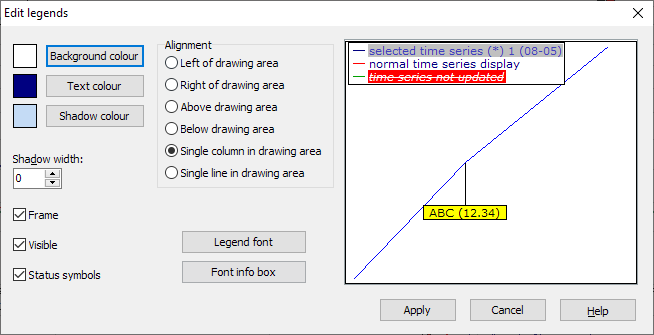
Options in the "Legends in chart" dialog box
|
Field |
Description |
|---|---|
|
Colors |
Click the corresponding button to change individual colors. The colors of the legend are defined in the following dialog boxes. |
|
Shadow width |
Specifies the width of the shadow in points. |
|
Font legend |
Opens a dialog box in which you can define the font and color of the text. |
|
Font info box |
Opens a dialog box in which you can define the font and color of the text in the hint boxes. |
|
Alignment |
Choose between left, right, above, below, single-column or single-line. |
|
Frame |
Activate this checkbox to draw the frame around the legend. Activated by default. |
|
Visible |
Uncheck this box to remove the legend. |
|
Status symbols |
Activated by default. If you deactivate this checkbox, all status symbols in the legend disappear, e.g. the asterisk "*" after "Close" or the ">" characters. |