
You can search for a specific securities account in the upper "Securities account" area of the "Filter" tab of the order book and only display the associated orders. Proceed as follows:
-
If necessary, switch to the "Filter" tab.
-
Enter the name or the securities account number in the "Securities account" input field or search for the desired securities account using the "Search" icon.
-
Then select the corresponding "Show orders" button.
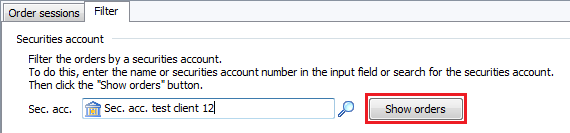
Only the orders for this securities account are now displayed in the order book.
Alternatively, you also have the option of opening the order book with the orders for this securities account from the context menu of a securities account in the Explorer. Proceed as follows:
-
If necessary, open the folder with the desired depot in Explorer.
-
Open the context menu of the securities account with the right mouse button and select the command DEPOT, DISPLAY IN ORDER BOOK.
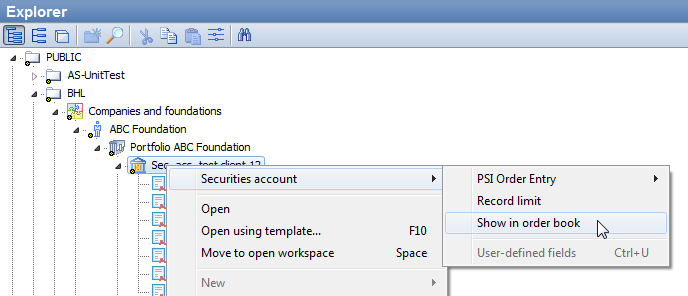
The orders for this securities account are displayed in the order book.