
Portfolio Risk Service" module
You can configure a proxy for the risk service if required. Proceed as follows:
-

-
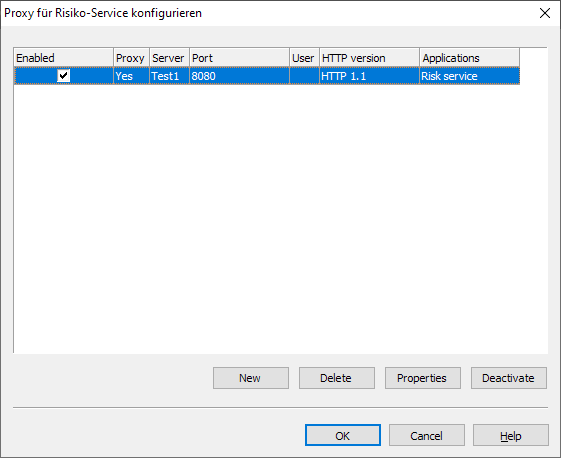
Configure your proxy in the "Configure proxy for risk service" dialog box that appears.
-
Confirm the configuration and close the dialog box with the "OK" button.
Details on the individual functions in the "Configure proxy for risk service" dialog box:
|
Field |
Description |
|---|---|
|
New" button |
Select this button to create a new proxy. |
|
Delete" button |
Select this button to delete the proxy currently selected in the list. |
|
Properties" button |
Select this button to view or edit the properties of the currently selected proxy. |
|
Activate" or "Deactivate" button |
Select this button to activate or deactivate the currently selected proxy. The active proxy can be recognized by the activated checkbox in the "Active" column. |
|
OK" button |
Select this button to confirm the entries and close the dialog box. |
|
Cancel" button |
Select this button to close the dialog box without saving any changes. |
|
Help" button |
Select this button to open the context-sensitive online help for the topic. |