Portfolio Service Investment Agent" module or "Portfolio Service Rebalancing" module
If you have saved amount orders in an order session as described above, you can recognize them in the order book.
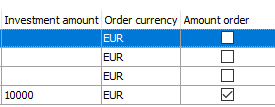
To do this, show the "Amount order" column in the order book, which is hidden by default.
Unknown Attachment
Unknown Attachment
Amount orders are then marked as such in the "Amount order" column, the investment amount is shown in the "Investment amount" column and the investment currency is shown in the "Order currency" column: