
Module "PSI Order Entry per bank or fax order"
In addition to the interface-specific settings for each PSI Order Entry, the "PSI Order Entry - Configuration" dialog box also contains general setting options that can be stored for several PSI Order Entries. Proceed as follows to make these settings:
-
In the Infront Portfolio Manager ribbon, on the Ordering tab, select GENERAL SETTINGS, CONFIGURATION from the PSI Order Entry icon menu.
-
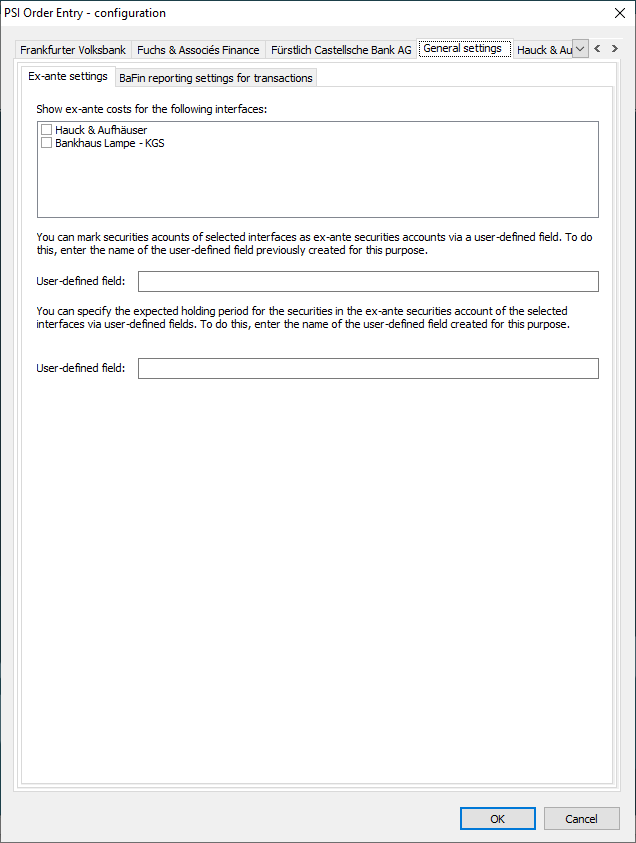
Make your settings on the "General settings" tab in the "PSI Order Entry - Configuration" dialog box that appears.
-
Finally, save the settings with "OK".
In detail, you have the following setting options on the "General settings" tab:
|
Ex-ante settings" tab |
|
|---|---|
|
Element |
Description |
|
Show ex-ante costs for the following interfaces |
On the "Ex-ante settings" tab, you can determine for which interfaces ex-ante costs should be displayed. To do this, activate the checkboxes for the respective interfaces. |
|
User-defined field for "ex-ante deposits" |
You can mark depots of the interfaces selected above as "ex-ante depots" via a user-defined field. To do this, enter the name of the user-defined field created for this purpose in the input field. |
|
User-defined field for "Holding period" |
You can enter an expected holding period for the securities in the ex ante securities accounts of the interfaces selected above via a user-defined field. To do this, enter the name of the user-defined field created for this purpose in the input field below. |
|
"BaFin reporting settings transactions" tab |
|
|
Element |
Description |
|
Activate BaFin reporting for transactions for the following interfaces |
[Only for dwpbank interfaces] On this "BaFin reporting settings transactions" tab, activate the checkboxes of the dwpbank interfaces for which you want to activate BaFin reporting of dwpbank. |
|
Multi-channel ordering (only with module of the same name) |
|
|
Element |
Description |
|
User-defined field |
You can use a user-defined field to define a home exchange for securities that you wish to trade via multi-channel ordering. To do this, enter the name of the user-defined field created for this purpose in the input field. |
You make the interface-specific settings for each licensed PSI Order Entry in the "PSI Order Entry - Configuration" dialog box on the tabs that are then visible.