
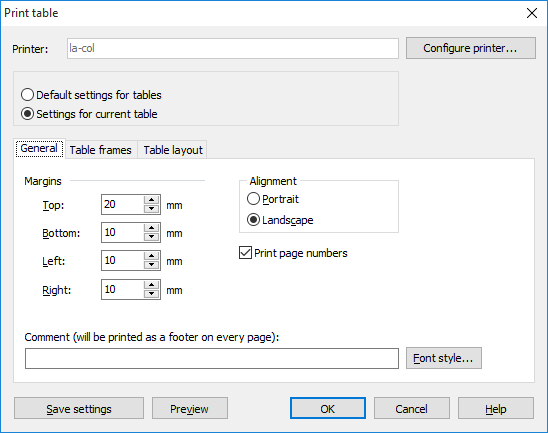
On the "General" tab, you can change the page margins, the format and the font for printing. A preview is also available which shows the image as it will be output on the printer.
|
Element |
Designation |
|---|---|
|
Margins |
Here you set the respective distance to the page margin in millimeters. |
|
Print page numbers |
Activate this checkbox if you want the page numbers to appear on the printout. |
|
Alignment |
Activate the respective option to print in portrait or landscape format. |
|
Remark |
Enter the text that is to be printed as a "footer" under the chart or under the table, for example. |
|
Font.. |
Click on this button to define the font for printing the comment line. To completely change the font in a table, for example, you can use the options described in the chapter Changing the font . |
|
Save settings |
Click on this button to save the changes for the next printing process. |
|
Preview |
The print preview shows you the image as it will be output on the printer. |